Alarm settings control how the V380 Pro WiFi camera responds to detected activity. When motion detection is active and an alarm is triggered, the app can receive an alarm notification.
[reference] Title: Alarm On Text: Enables or disables the camera alarm function. Title: Motion Detection Text: Triggers an alarm event when movement is detected in the camera view. Title: Alarm Schedule Text: Limits alarm monitoring to selected time periods when this option is available. Title: Alarm Area Text: Limits motion-triggered alarms to a selected part of the camera view when supported. Title: Alarm Sound Text: Controls an audible alarm response on compatible camera models. [/reference]Before You Start
[checklist] * V380 Pro WiFi camera is powered on * Camera is connected and accessible in the app * The correct camera is selected * App notifications are allowed if you want alerts to appear on the device [/checklist]Enable the Alarm
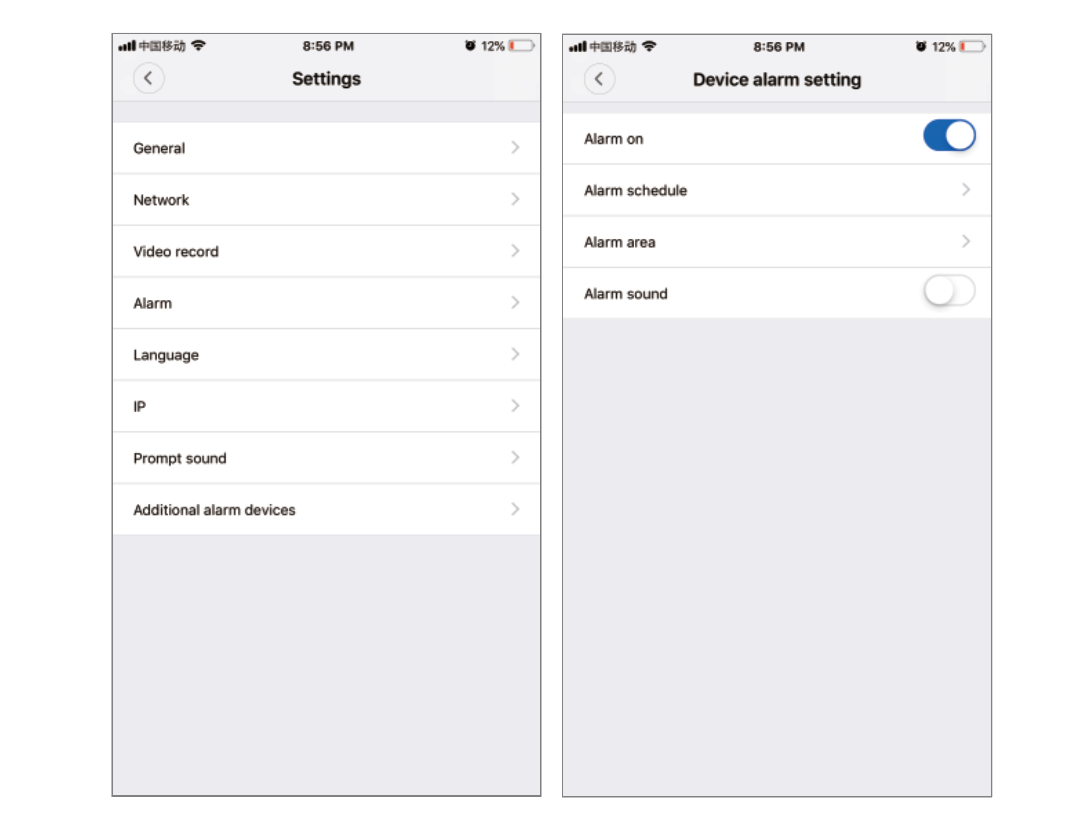 [step]
1. Open the connected V380 Pro WiFi camera in the app.
2. Open Settings for that camera.
3. Select Alarm or Alarm settings.
4. Turn on Alarm on.
5. If separate alarm types are shown, select Motion Detection and enable it.
6. Review any available alarm schedule, alarm area, or alarm sound options and adjust them for how you want the camera to monitor activity.
7. Return to the previous screen after completing the settings.
[/step]
[note]
The names and arrangement of alarm controls can vary with the camera model and app version. Some cameras show a single Alarm on switch, while others provide separate detection types and additional alarm options.
[/note]
Motion Detection Behavior
With the alarm function enabled, movement in the monitored camera view can create an alarm event. The event can then be presented through the app according to the available alarm and notification settings.
- Keep the alarm enabled when motion monitoring is needed.
- Use an alarm schedule if you only want monitoring during selected periods.
- Use an alarm area if you want detection focused on a particular part of the camera view.
- Review notification settings if you want alarm events to appear as device alerts.
Alarm Area
On cameras that provide an Alarm Area option, you can select the part of the camera view that should be monitored for alarm-triggering movement. Activity outside the selected area may not trigger the same motion alarm.
[tip] Choose an alarm area that covers the part of the scene you actually want to monitor. A smaller, more relevant area can reduce alerts caused by movement elsewhere in the view. [/tip]Alarm Schedule
If Alarm Schedule is available, use it to select the periods when the alarm function should be active. This is useful when motion alerts are only needed during particular times.
[compare] Alarm enabled continuously | Motion monitoring remains available throughout the configured alarm period. Scheduled alarm | Motion monitoring is limited to the periods selected in the alarm schedule. [/compare]Additional Detection Options
Some V380 Pro WiFi camera variants can show additional alarm types or detection controls. These options depend on the hardware and available software features.
- AI human detection: Available on compatible cameras and intended to identify human-shaped activity.
- PIR detection: Available only on cameras equipped with a PIR sensor.
- Alarm beacon: Available only on camera models that include a compatible alarm light or beacon.