How to restore factory settings v380 pro wifi
How to restore factory settings
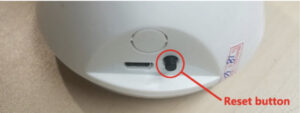
Long press the reset button for 6-7 seconds [restore factory settings], device with loudspeaker will speak“restore factory settings” “restore factory settings” mode 1: Part of head shaking devices has a button next to the English mark“RESET” (as shown below)
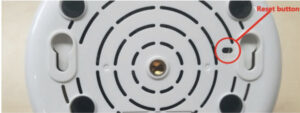
Method 2: Part of head shaking and panoramic machines have a hole on its body with English mark”RESET”beside, press and hold the hole with a pin or something similar for seconds (as shown below)
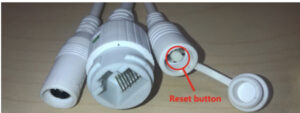
method 3: Outdoor devices and large triangle panoramic devices have wires, one of the wires is cappped,remove the cover and long press the button inside (as shown below)
Note: Restoring the factory settings will clear the configuration information and the device password. After reset, you need to reconfigure the network and set the password.
· Restore factory default settings function
1) Clear WiFi information and IP configuration information
2) Clear user information (username and password)
3) Clear hotspot password
4) Turn on system voice prompt
5) Unbind cloud service
6) Alarm function
a. Set the arming state to off
b. Set the alarm area to All
c. The alarm time period is set to all-day alarm
d. Turn off the alarm tone
7) PTZ function
a. Clear the PTZ power-off memory position
b. Clear the PTZ patrol setting
c. Turn off the movement tracking function
8) Light control function
a. The light control is set to [Auto]
b. Clear the timing switch light setting
9) The image attribute is set to [Auto]
Note: After the device is restored to factory default settings, the network needs to be reconfigured.
https://v380.org/